Interval Chart
The Interval Chart shows production against target for one day, in intervals of one hour or 30 minutes. Use it to run Short Interval Control (SIC) with your team on the shop floor: review each interval, and act on a shortfall before the shift ends.
Using the Interval Chart
Open Production > Interval Chart.
- Choose the day, and the Stations and SKUs to include.
- Choose the interval length: 1 hour or 30 mins. Busroot remembers your choice.
The page refreshes every 30 seconds, so you can leave it open during the shift.
The chart shows, for each interval:
- Actual (green): the units produced, good and bad. See Production count.
- Shortfall (red): the units short of the target, because of downtime or slow production.
The table under the chart shows the same figures for each interval:
| Column | What it shows |
|---|---|
| Time | The start and end of the interval. |
| Actual | Units produced in the interval, good and bad. |
| Target | Target count for the interval. It is only shown when a production schedule is running on the station. |
| Shortfall | Target minus Actual, when Actual is lower. |
| Production Output Value | The value of the good units produced, from each SKU's value. Shown only when lost production cost is turned on. |
| Lost Production Cost | Lost production cost in the interval. Shown only when lost production cost is turned on. |
You can download the table as CSV.
Lost production cost
When lost production cost is turned on for your account, two cards above the chart show the day's Production Output Value and its Lost Production Cost, as a total and as a percentage.
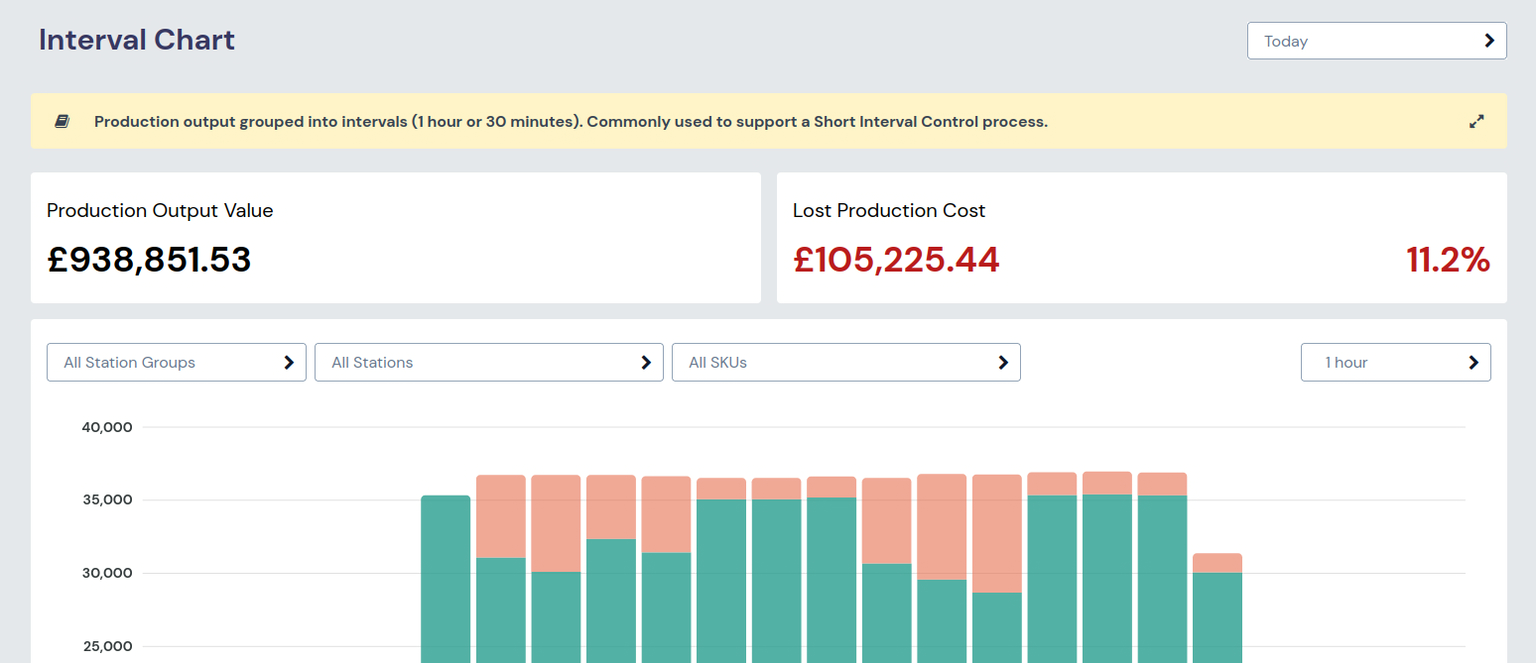
The Interval Chart shows lost production cost as a total. OEE Analysis shows the cost of downtime by reason. The cost uses each SKU's value, set in SKU admin.
To turn on lost production cost, set Enable Lost Production Cost in Account settings.
Before you start
- Stations need production schedules for a target to be shown. See Gantt & Schedules.
- Each SKU needs a performance target, and a value if you use lost production cost. See SKU.