Week 32 | 2026
Granular control, downtime accountability, and faster analysis
This release introduces per-station feature configuration, mandatory downtime notes, and significant performance improvements across analysis pages.
New Features
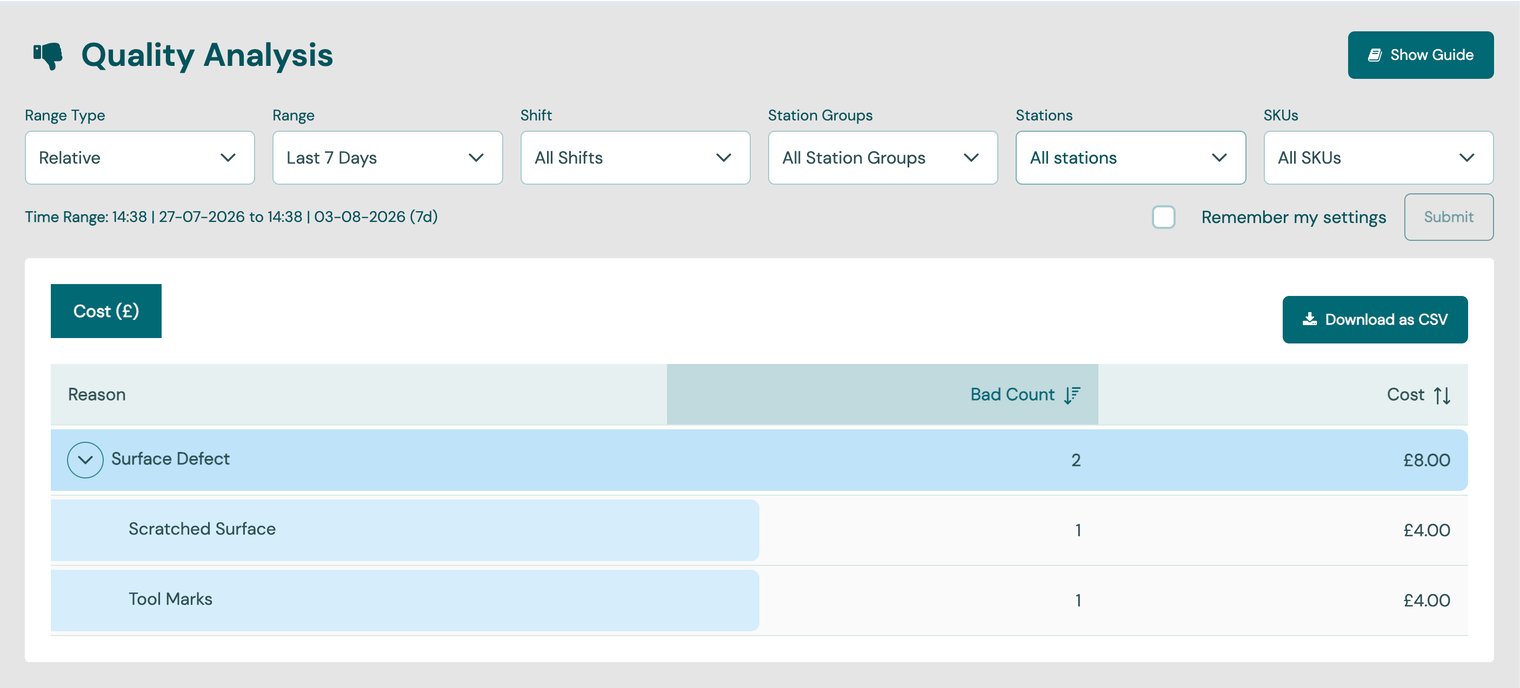
Quality Analysis Bad production can now carry a quality reason. A new quality reason type sits alongside downtime and non-production in the reasons admin.
- Quality Analysis page — reason-breadcrumb drill-down with Bad Count and Cost columns, SKU filter and CSV export (mirrors Downtime Analysis).
- Tablet — optional quality-reason picker when entering bad quantity.
- Signals —
bad_production_reasonfield applies to the bad count in the same message. - Production Entries — new Bad Quality column-group toggle, plus a Bad Reason column in CSV export.
Granular feature configuration
- Manual production, manual downtime, production correction and schedule flexibility can be configured at plant, station group or station level — not just account-wide. Stations inherit their plant's setting unless overridden.
- Example: enable manual downtime for one line while keeping it off for the rest of the plant.
Mandatory downtime notes
- Downtime reasons can be flagged to require a note. When assigned (tablet, web or SDK), a free-text explanation is required. Notes appear on the Downtime List, detail view and CSV exports.
Task availability windows
- Cron-based Tasks gain an "Available Before Deadline" setting; a Task only shows on the tablet once the lead time begins.
Station Notes history on the tablet
- Tapping the note in the station header opens a history of the last 5 notes. "Add Note" works as before.
Long-range date searches
- 3-, 6- and 12-month relative date ranges across OEE, Trend, Hierarchy Explorer, Production views, Cycle Time Analysis and Downtime Analysis — analyse up to a full year of data.
Improvements
- Energy metering support — plant- and group-level energy meters can be modelled as dedicated meter stations, with energy computed automatically and kept separate from production views.
- Cycle Time Analysis loads up to 24× faster — year-long SKU station queries now resolve in under a second (from ~12s). The detail page carries filters forward when drilling in.
- Faster Weekly Report — tabs load on demand; station and SKU data fetched in single requests.